HUD Panels & Layout
Panels are the containers that organize your elements into a cohesive HUD layout. They handle the complex math of vertical stacking and dynamic resizing.
The HudPanel Container
A HudPanel is essentially a list of HudElement objects. When the HUD
renders, it iterates through these elements in the order they were added.
public static class HudPanel {
    private final Identifier id;
    private final List<HudElement> elements = new ArrayList<>();

    public HudPanel(Identifier id) { this.id = id; }
    public void addElement(HudElement element) { elements.add(element); }
}
The Layout Algorithm
I've implemented a Sequential Vertical Stacker. Here is how the panel calculates where each element goes:
int currentY = startY;
for (HudElement element : elements) {
    // Each element returns how much height it used
    int heightUsed = element.render(..., currentY, ...);
    currentY += heightUsed;
}
Working Example: Custom Layout & Sizing
If you want to completely replace the Item Glow HUD with your own design, you can define a new HudPanel and even override the global dimensions to create a "Mini-HUD".
public void applyCustomLayout() {
    // 1. Create the panel
    ItemGlowApi.HudPanel myHud = new ItemGlowApi.HudPanel(Identifier.of("mymod", "minimal"));

    // 2. Add elements
    myHud.addElement(new NameLineElement());

    // 3. Set custom dimensions (Width: 120, Height: 25)
    myHud.setDimensions(120, 25);

    // 4. Register as the active panel
    ItemGlowApi.registerPanel(myHud);
}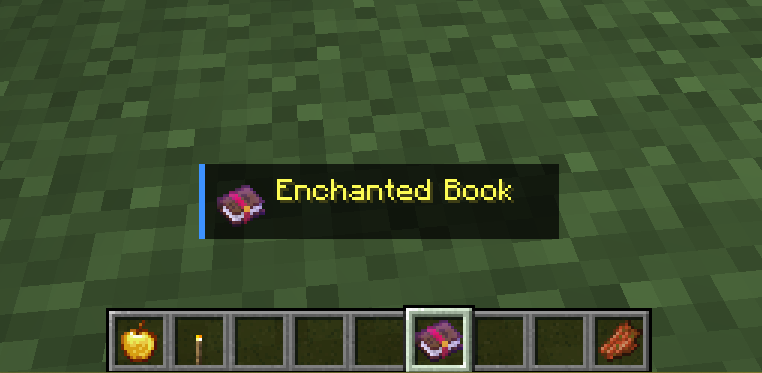
Figure 2.0: A custom Mini-HUD triggered when holding an Enchanted Book, utilizing setDimensions(120, 25).
Triggering the Swap
You can use standard Minecraft tick events or keybinds to swap profiles dynamically based on the player's context.
// Example: Swapping to a minimal HUD when holding an Enchanted Book
if (curMain.isOf(Items.ENCHANTED_BOOK)) {
    com.itemglow.api.ItemGlowApi.registerProfile(Identifier.of("mymod", "minimal"));
} else {
    com.itemglow.api.ItemGlowApi.registerProfile(Identifier.of("itemglow", "default"));
}
Visual Padding & Spacing
To keep the HUD looking professional, I follow a strict padding grid. When building custom panels, I recommend following these spacing rules:
| Element Type | Recommended Return Height | Note |
|---|---|---|
| Single Text Line | 11 |
Standard Minecraft text height (9px) + 2px gap. |
| Horizontal Bar | 6 |
Bar height (4px) + 2px gap. |
| Pill Row | Variable |
The renderPills utility calculates this for you. |