The HudElement Engine
Every piece of data on the HUD is a first-class citizen called a
HudElement. This interface gives you total control over the rendering pipeline.
The HudElement Interface
I've designed the element system to be functional and lightweight. An element is responsible for two things: identifying itself and rendering its content while returning the vertical space it occupied.
public interface HudElement {
    Identifier getId();

    // Returns the height (in pixels) that this element consumed
    int render(DrawContext context, MinecraftClient client, ItemStack stack,
               int x, int y, int maxWidth, float alpha, float ageSinceEquip);
}
Parameter Breakdown
| Parameter | Purpose |
|---|---|
x, y |
The absolute screen coordinates where your element should start drawing. |
maxWidth |
The boundary you should not exceed to maintain HUD visual integrity. |
alpha |
The 0.0-1.0 transparency value. You must apply this to your colors. |
ageSinceEquip |
Total ticks since the item was held. Perfect for time-based animations. |
Default Elements Reference
I've provided several built-in elements that you can reuse or extend. These are located in
com.itemglow.elements.DefaultElements.
NameLineElement
Handles the primary item name rendering, including rarity colors and automatic font scaling for long names.
DurabilityBarElement
Renders the health bar and durability text (e.g., "240 / 250") with color-shifting logic.
EnchantRowElement
The heavy lifter that renders enchantments, potion effects, and food data using the "Pill" system.
Working Example: Pulsing Mana Bar
This is a complete, working example of an element that renders a blue mana bar that pulses when the player's mana (a hypothetical component) is low.
public static class ManaBarElement implements ItemGlowApi.HudElement {
    @Override
    public Identifier getId() { return Identifier.of("mymod", "mana_bar"); }

    @Override
    public int render(DrawContext ctx, MinecraftClient client, ItemStack stack,
                      int x, int y, int mW, float alpha, float age) {

        float mana = 0.3f; // Scraped from your mod's data
        int a = (int)(alpha * 255);

        // Calculate pulse effect using 'age'
        float pulse = mana < 0.4f ? (MathHelper.sin(age * 0.5f) + 1.0f) * 0.5f : 0.0f;
        int color = (a << 24) | (int)(pulse * 100) << 16 | 0x55AAFF;

        // Draw the background and bar
        ctx.fill(x, y + 2, x + mW, y + 4, (a / 2 << 24) | 0x222222);
        ctx.fill(x, y + 2, x + (int)(mW * mana), y + 4, color);

        return 6; // We used 6 pixels of height
    }
}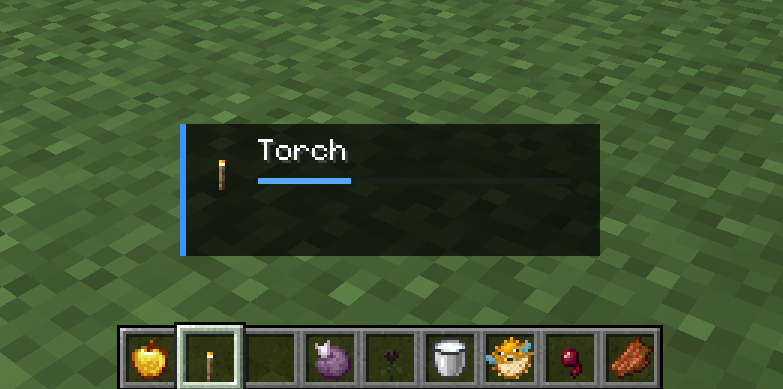
Figure 1.0: A custom Mana Bar element integrated into the Item Glow HUD, showing a low-mana pulse effect.
Registration
Once you've created your HudElement, you need to tell Item Glow where to render it. You can either create a completely new layout (see HUD Panels) or simply append your element to the default HUD.
// 1. Get the default panel
HudPanel def = ItemGlowApi.getPanel(Identifier.of("itemglow", "default"));

// 2. Append your element
if (def != null) {
    def.addElement(new ManaBarElement());
}